Landing Page Builder

Create an App Landing Page

Go from idea to a professionally designed, conversion-optimized app landing page — powered by AI

No credit card required · 14-day free trial

Examples

App landing pages built with one prompt

Diverse app landing pages created with Swipe Genie to demonstrate the range of what's possible

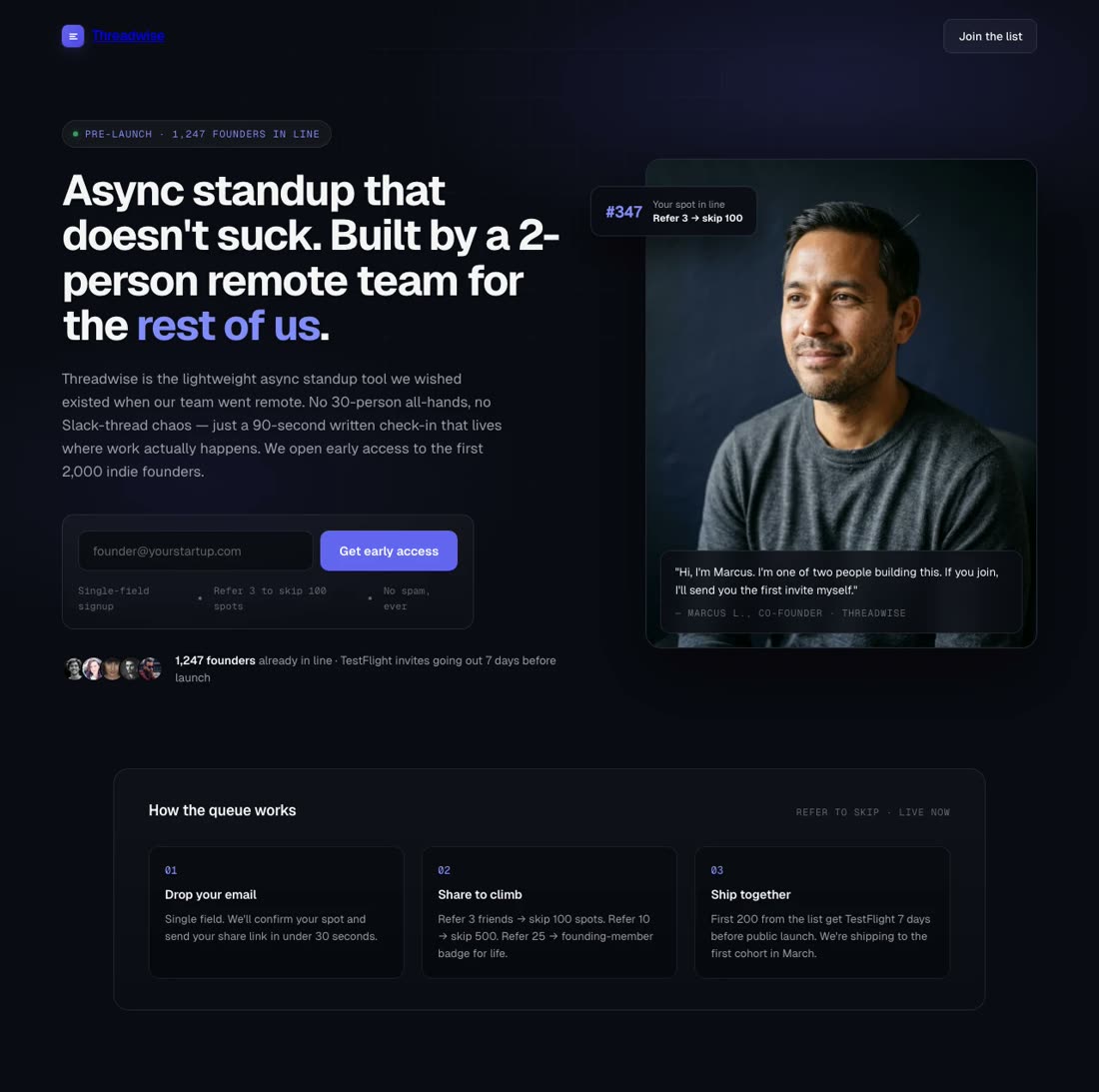
App Download

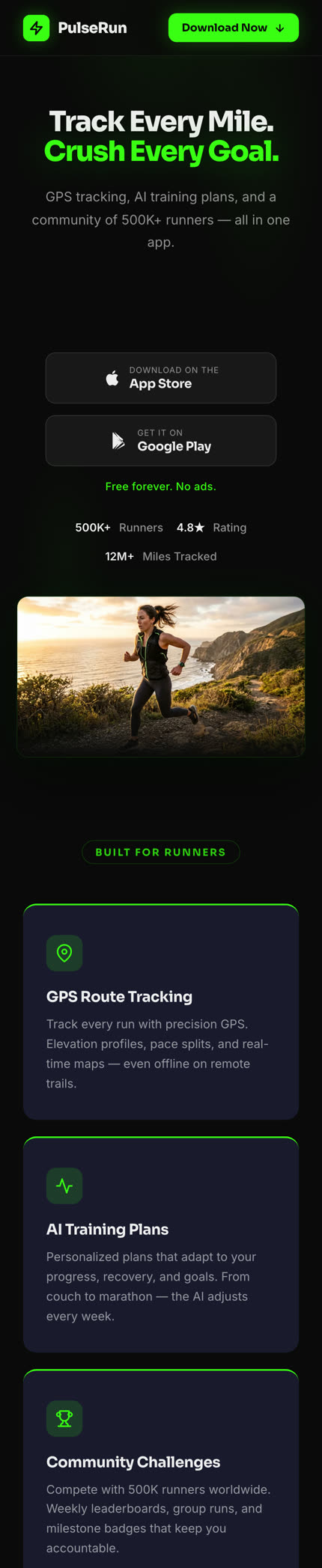
"Create a landing page for PulseRun, a fitness tracking app for runners. Bold, energetic design with a dark background and neon green accents."

Fitness Tracker App

Beta Signup

"Build a landing page for FocusFlow, a productivity app in private beta for iOS. Clean, minimal design with a white background."

Productivity App

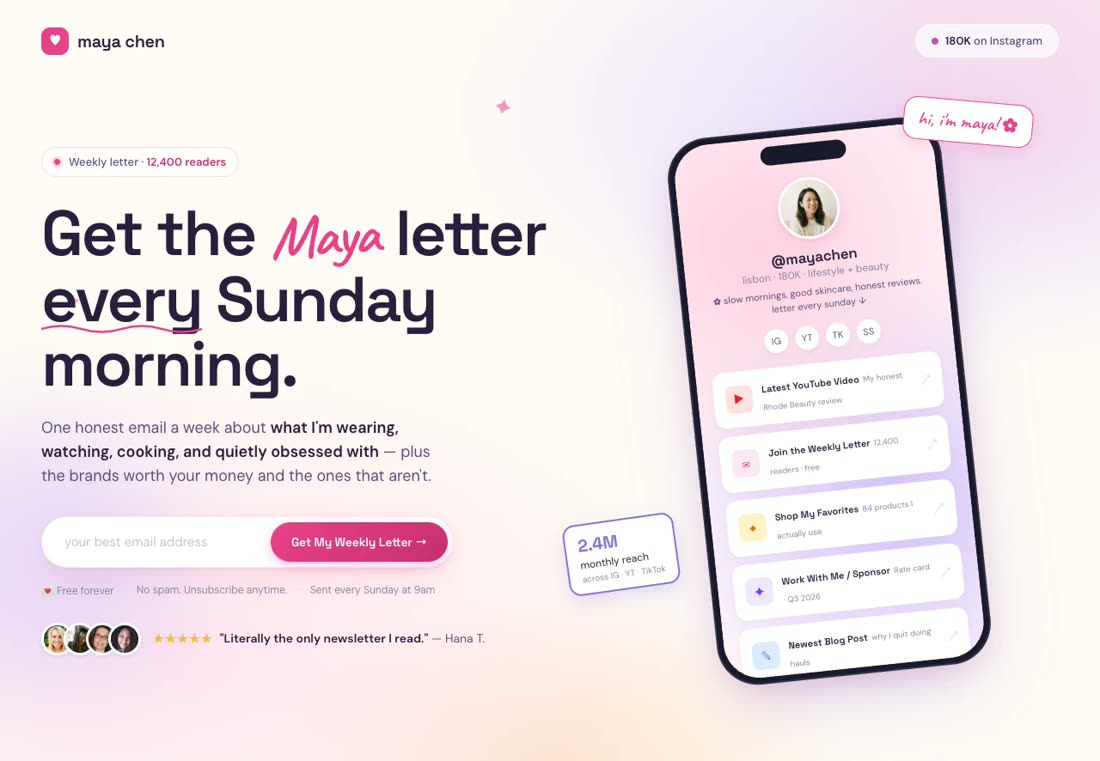
Feature Announcement

"Create a landing page announcing a new budgeting feature for VaultPay, a personal finance app. Professional, trust-forward design."

Banking App Feature Update

App Download

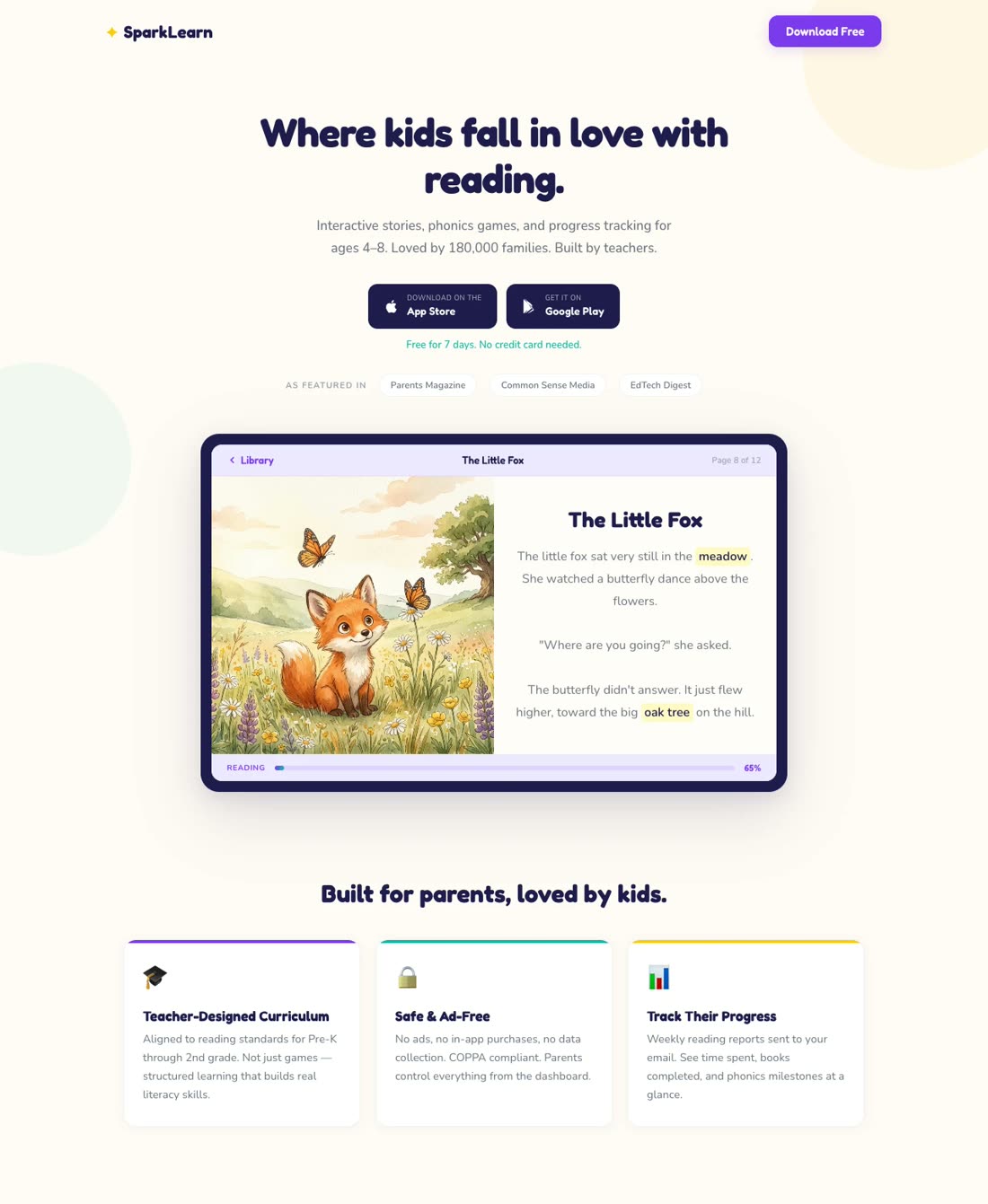
"Design a landing page for SparkLearn, a reading app for kids aged 4-8. Bright, playful design with illustrations."

Kids Education App

Companion App Promo

"Build a landing page for the TeamSync mobile app, a companion to our desktop project management platform."

SaaS Mobile Companion

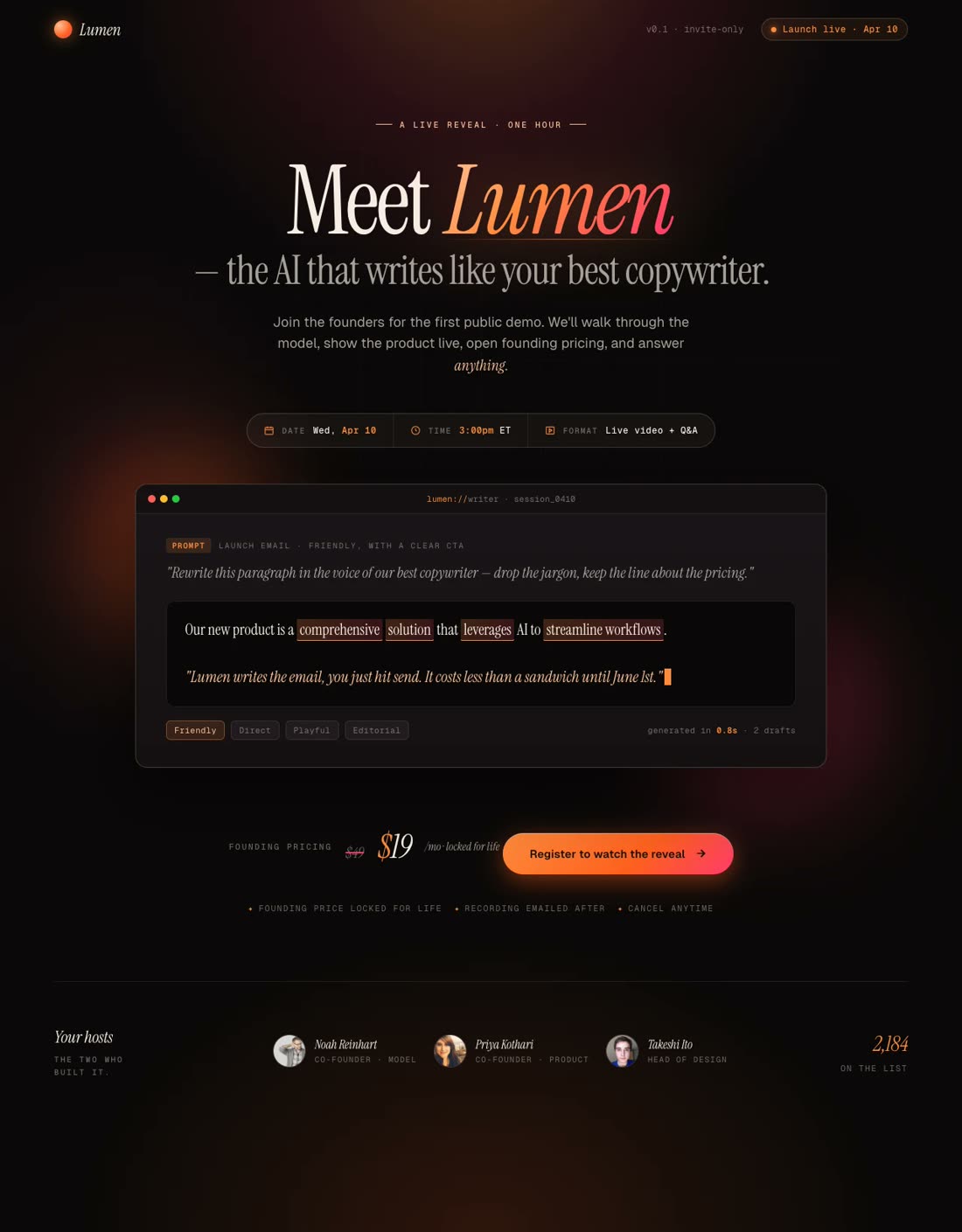
Local Launch

"Create a vibrant landing page for BiteDash, a food delivery app launching in Austin, TX. Warm, appetizing design."

Food Delivery App

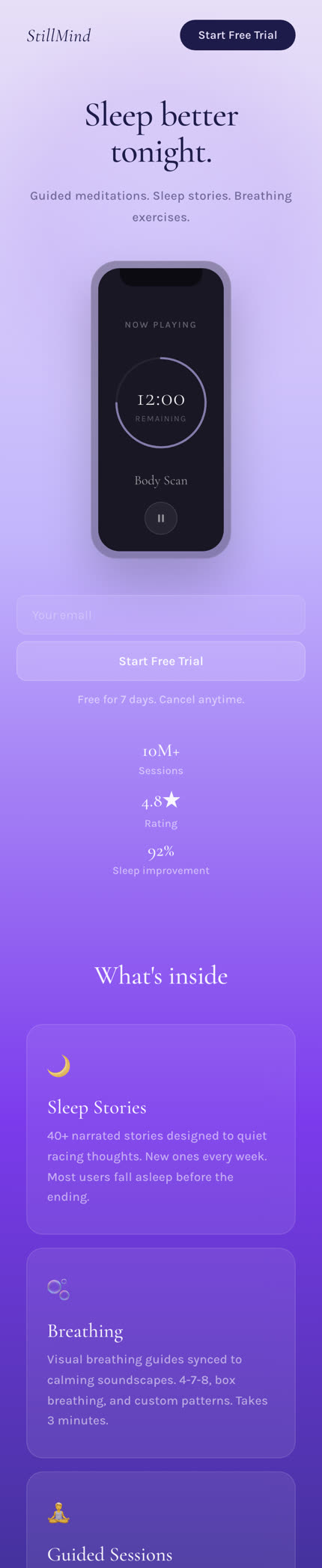
Free Trial Capture

"Design a serene landing page for StillMind, a meditation and sleep app. Calming gradients — soft lavender fading to deep indigo."

Meditation App

Build Your App Landing Page

No Credit Card Required | Try for Free

How It Works

How to create an app landing page

01

Describe Your Business, Goals & Objectives

Share your app details, target audience, and goal — downloads, beta signups, or feature promotion. Paste your App Store link, user reviews, or upload screenshots.

02

Match Your Brand Style

Pick a design preset or let the AI pull your brand identity from your existing website or app listing.

03

Watch Swipe Pages AI Create Your App Landing Page

The AI builds your complete page — device mockups, feature highlights, social proof, download badges, CTAs — optimized for installs.

04

Edit & Publish

Refine by chatting with the AI. Swap screenshots, add a demo video, adjust copy. Publish — live on a global CDN in seconds.

Worth reading before you build

Why your app needs a landing page

important!

Shipping your app to the App Store or Google Play and hoping for downloads is like opening a restaurant on a side street with no sign. The store listing is necessary, but it's not a marketing strategy. A dedicated app landing page gives you what a store listing can't: control over the narrative, the design, and the conversion path.

Here's the reality of relying solely on app stores. The average App Store page converts at about 25% and Google Play at 27% — but those numbers are misleading. They count only people who already found your listing, usually through a search for your exact category. For paid traffic, those conversion rates drop significantly because you're sending cold audiences to a page you can't customize beyond Apple's and Google's rigid templates.

A dedicated landing page flips this. You control the headline, the visual hierarchy, the social proof placement, and the CTA. You can run A/B tests on your messaging — something impossible on an app store listing without Apple's Custom Product Pages (which are limited to 35 variants and require approval cycles). According to UXCam's 2026 benchmarks, mobile-responsive landing pages convert at 11.7% compared to the 2.5-2.9% average for generic mobile pages. That's a 4x lift from simply giving your traffic a better destination.

The performance gap between mobile and desktop is the elephant in every app marketer's room. Desktop pages convert at roughly 5%, while mobile hovers around 2.5-2.9% — a 40-50% gap. For an app company, this is your core audience underperforming. The fix isn't to accept the gap; it's to build pages specifically engineered for mobile speed and usability. Page load time matters enormously here — every 0.1-second improvement lifts conversions by 8-10%, and 53% of mobile users abandon sites that take longer than 3 seconds to load.

This is where app landing pages earn their keep for paid campaigns specifically. If you're running Meta ads or Google App campaigns, you're already paying per click. Sending a $2-5 click to a generic homepage or straight to the app store wastes budget. A dedicated landing page that pre-sells the app — showing the interface, explaining the value, addressing objections — warms up the visitor before they ever hit the download button. Video on landing pages alone can boost conversions by up to 86%.

For apps in competitive categories like fitness, finance, or food delivery, differentiation happens on the landing page, not the store. Your App Store listing looks like everyone else's — icon, screenshots, description, reviews. Your landing page is where you tell the story your competitors can't copy. It's where you put the demo video, the founder's story, the comparison chart, the press logos, and the testimonial that makes someone think "this is the one." For more details, check out the DigitalOcean App Platform example in our inspiration gallery and our mobile landing pages guide.

Features

Everything app marketers need. Nothing they don't.

Create a SaaS comparison page for Acme

Every App Page — One Prompt Away

Download pages, beta signup pages, feature announcements, app comparison pages — describe what you need and the AI builds it aligned to your brand.

Audit Complete

Idea: Change CTA text to "Start Free Trial" to lift conversions by ~12%.

Apply
Dismiss

CRO AI Agent

The AI agent monitors your performance and suggests data-driven improvements to lift conversion.

Winner
14.2%
Variant A
vs
8.5%
Variant B

A/B Testing & Built-In Analytics

Test different app screenshots, hero mockups, and copy. Server-side split testing with built-in analytics and GA4/Meta CAPI integration.

99

Blazing Fast

Sub-second load times on a global CDN. Speed isn't a feature — it's the foundation of mobile conversion.

Integrations with Your Stack

Mailchimp, ConvertKit, HubSpot, Zapier — every signup goes directly to your email list, ready for your welcome sequence.

Mobile-First Design

Your audience lives on mobile. Deliver a swipe-based experience with persistent download CTAs.

Startup
$29
Agency
$149

Pricing That Makes Sense

Plans start at $29/mo. No traffic penalties — your viral launch day doesn't trigger overage fees. 14-day free trial, no credit card.

English → Spanish

One-Click Translation

Translate your app landing page into any language instantly. Scale internationally without rebuilding.

Social Proof

Trusted by 7,000+ teams worldwide

4.8
★★★★★
G2
4.9
★★★★★
Capterra
300+ reviews
Speed
★★★★★

Pages are also FAST - again compared to some competing products ahem, ClickFunnels, on mobile and desktop which is critical for conversions.

Clement W.

Director · G2

Mobile
★★★★★

They've got this feature where you can make mobile versions of your pages that look like Instagram Stories. It's got a CTA that's always in sight, and it's something I haven't seen with any other tool.

Piotr C.

G2

Conversions
★★★★★

I have been able to create very highly converted landing pages for my courses, and feedbacks from users / students are simply unbelievable, thanks a lot to SwipePages.

Hoang P.

Director · G2

Ease of Use
★★★★★

SwipePages makes it easy to go from idea to live landing page in under an hour. And now, for my lead magnets, I have a template I have customized for my brand and I can go from idea to leadgen landing page in 5-10 mins.

Bryan B.

Work Management Consultant · G2

Mobile
★★★★★

Swipe Pages is the perfect landing page builder for any marketer looking to create optimized, mobile-friendly landing pages quickly. For us, this service saves a lot of time.

Vitali K.

CEO · G2

Value
★★★★★

The overall package, SwipePages is at the same level of leading landing page tools but at a fraction of their price.

Matthew S.

CEO · G2

A/B Testing
★★★★★

Server side A/B testing: allowing to compare different versions of a page to determine which performs best.

Verified User

G2 Review

No-Code
★★★★★

Even for people with no prior web design experience. Its drag and drop interface makes creating beautiful, professional-looking websites simple and fast.

Aditya S.

Proprietor · G2

Overall
★★★★★

The only Landing Page builder you will ever need!

Kamil N.

Website Developer · G2

FAQ

Frequently asked questions

An app store listing gives you a fixed format. Every app in your category looks roughly the same. A dedicated app landing page lets you break out of that box and actually sell.

The business case is straightforward. App store listings convert visitors who already searched for your category. But most app marketing involves paid traffic — ads on Meta, Google, TikTok, or display networks — where you're reaching people who weren't looking for you. Sending cold traffic directly to the App Store means they see your listing alongside competitors, read a few reviews, and often bounce. A landing page intercepts that journey with a controlled narrative: here's the problem, here's how we solve it, here's proof, here's the download button.

Beyond paid campaigns, an app landing page gives you an owned web presence that ranks in Google. App Store search is competitive and algorithmically opaque. Google search is competitive too, but you have far more levers — SEO, content, backlinks, site speed. A fast, well-optimized landing page can rank for "[category] app" keywords and drive organic installs indefinitely, no ad spend required.

There are practical benefits too. You can A/B test messaging on a landing page — something you can't do freely on app stores. You can embed demo videos, interactive previews, pricing comparisons, and long-form social proof that wouldn't fit in a store listing. You can retarget page visitors who didn't download. And you can track the full conversion funnel from click to install, which app store attribution often obscures. For apps with a web counterpart — SaaS tools, marketplaces, platforms — the landing page also serves as a bridge between the web experience and the mobile app, driving cross-platform adoption.
The best app landing pages follow a structure that mirrors how people evaluate software: hook them, show them, prove it, and make the next step obvious.

Hero section. Start with a clear headline that states what the app does and who it's for — not a tagline, but a value proposition. Pair it with a device mockup showing the app's most compelling screen. The hero should immediately answer "what is this?" and "why should I care?" Include your primary CTA (download badges or email capture) above the fold.

Feature showcase. Break down 3-5 key features with screenshots or animations from the actual app. Don't just list features — show them in context. A fitness app should show the workout tracking screen; a finance app should show the budget dashboard. Each feature gets a headline, a short benefit statement, and a visual.

Social proof. App ratings, review counts, press mentions, and user testimonials. If you have notable numbers — "500K+ downloads," "4.8★ with 10K reviews" — lead with those. Include logos of press outlets or award badges. For B2B apps, enterprise client logos carry significant weight.

How it works. A simple 3-step visual flow showing the path from download to value. For a meditation app: "Download → Pick your goal → Start your first session." This reduces perceived complexity and pushes people past the "is this hard to set up?" objection.

Video or demo section. According to landing page research, video can lift conversions by up to 86%. A 60-90 second walkthrough showing the app in action is one of the highest-impact elements you can add.

Download CTA. Repeat the App Store and Google Play badges at multiple points — after the hero, after social proof, and at the footer. Every scroll depth should have an exit ramp to the download.

FAQ section. Address the friction questions: Is it free? Does it work on my device? How is my data handled? Can I cancel anytime? These reduce hesitation at the moment of decision.
Lead with the screen, not the icon. People evaluate apps visually. Your hero mockup should show the most compelling in-app screen — the one that makes people think "I want that." A dashboard, a result, a beautiful UI state. Not your splash screen.

Write for the scroll, not the fold. Mobile users scroll. Don't try to cram everything above the fold. Instead, build a narrative that flows: problem → solution → features → proof → CTA. Each section should pull the reader into the next one. Aim for 5-7 distinct sections on a typical app landing page.

Keep forms brutally short. If you're collecting beta signups or leads, email-only forms outperform multi-field forms dramatically. Research shows reducing form fields from 11 to 4 lifts conversions by 120%. For app landing pages specifically, the goal is often a download — which requires zero form fields. Remove every barrier between "I'm interested" and "it's on my phone."

Optimize for mobile speed obsessively. Your audience is mobile-first. Pages that load in under 1 second convert significantly better than pages that take 3+ seconds. Use compressed images, lazy loading, and a CDN. You can see how tech companies like DigitalOcean showcase their products through fast-loading landing pages in the Swipe Pages inspiration gallery.

Use platform-specific download badges. Always include both App Store and Google Play badges — even if you're iOS-only today. Position them as buttons, not afterthoughts. Make them large enough to tap easily on mobile (minimum 48x48px touch targets per Google's guidelines).

Localize when possible. If your app serves specific markets, create variations of your landing page with localized copy, currency, and imagery. An app landing page for a food delivery service in Austin should feel different from one targeting London.

Add a video walkthrough. Even a 60-second screen recording with voiceover can lift conversions significantly. Video helps people visualize the app experience before committing to a download, which is especially important for complex apps in fintech, health, or productivity categories.
Primary KPI: Install rate. The percentage of landing page visitors who actually download your app. Track this end-to-end — from page visit through app store and into the first open. Use deep links and attribution tools (Branch, Adjust, AppsFlyer) to connect the dots between your landing page and in-app events.

Secondary KPIs to watch:
Bounce rate — If visitors leave without scrolling, your hero isn't compelling enough. Aim for under 50%.
Scroll depth — Are people reaching your download CTA at the bottom? Heatmaps reveal where interest drops off.
Time on page — For app landing pages, 45-90 seconds suggests engagement. Under 15 seconds means your messaging missed.
CTA click-through rate — What percentage of visitors click a download badge or signup button? Track each CTA placement separately.


What to A/B test first:
1. Hero headline — Test benefit-driven vs. outcome-driven messaging. "Track every run" vs. "Run your fastest mile."
2. Hero mockup — Test different app screens in the device frame. The right screen can lift conversions 20%+.
3. Social proof placement — Test ratings/review counts in the hero vs. below the fold.
4. CTA copy — "Download Free" vs. "Get the App" vs. "Start Training" — the verb matters.
5. Page length — Test a short, punchy page vs. a longer, feature-rich version.


Conversion benchmarks: The median landing page converts at 6.6% across all industries. Well-optimized mobile app landing pages should target 8-12%. Top performers in categories like fitness and productivity push beyond 15%, especially with warm traffic from retargeting campaigns.

Attribution gotcha: App install attribution is notoriously messy because the journey crosses platforms (web → app store → app). Set up proper UTM parameters, use deferred deep links, and establish a clear attribution window (7-day click-through is standard).
App marketing has a specific technical problem: your audience is almost entirely mobile. Speed, responsive design, and mobile UX aren't nice-to-haves — they're the entire game.

AI that builds every page type your app needs. Download pages, beta signup pages, feature announcements, competitor comparisons, press pages — describe what you need and the AI creates it. Not a template with blanks. A fully designed, brand-aligned page built from your app's context. Need 10 localized variants for your international launch? The AI handles that too.

AI research built in. The AI analyzes competitor apps, extracts reviews for social proof, and researches your market before generating copy. Your landing page content comes backed by competitive intelligence, not guesswork.

Mobile-native experiences. Smart Pages create a swipe-based mobile experience that feels like using an app — not scrolling through a traditional web page. Persistent CTAs stay visible at every scroll depth. For a mobile-first audience, this interaction pattern converts.

Sub-second loads at any scale. Every page loads in under a second from a global CDN. No degradation during traffic spikes from App Store features or paid campaigns. No traffic-based pricing tiers that punish success.

CRO agent for continuous optimization. After launch, the CRO AI agent monitors conversion rates and suggests data-backed improvements — headline changes, social proof positioning, CTA copy tweaks. Continuous optimization without hiring a CRO consultant.

One-click translation for global launches. Expanding to LATAM, EMEA, or APAC? Translate any page into any language instantly. Localized pages convert dramatically better for consumer apps — and you don't have to rebuild a single section.

Personalization at scale. Running UA campaigns across different audience segments? Create distinct page variants for each — gamers vs. productivity users, iOS vs. Android — without rebuilding. Better message matching means better conversion rates across every campaign.

Pricing that works for app teams. Plans start at $29/mo, everything included. The Agency plan at $149/mo covers 500K visitors with unlimited domains — perfect for app studios managing multiple products or agencies running app marketing campaigns. 14-day free trial, no credit card required.

Start building your app landing page

Go from prompt to published page in minutes. 14-day free trial, no credit card required.

No credit card required · Instant setup