
Unbounce Pricing 2026: Plans, Costs & Overage Fees
Written By Swami
Unbounce pricing for 2026: all six plans and their limits, the $80 per 10,000 visits overage fee, what each tier gates, and how the real bill compares.


Written By Swami
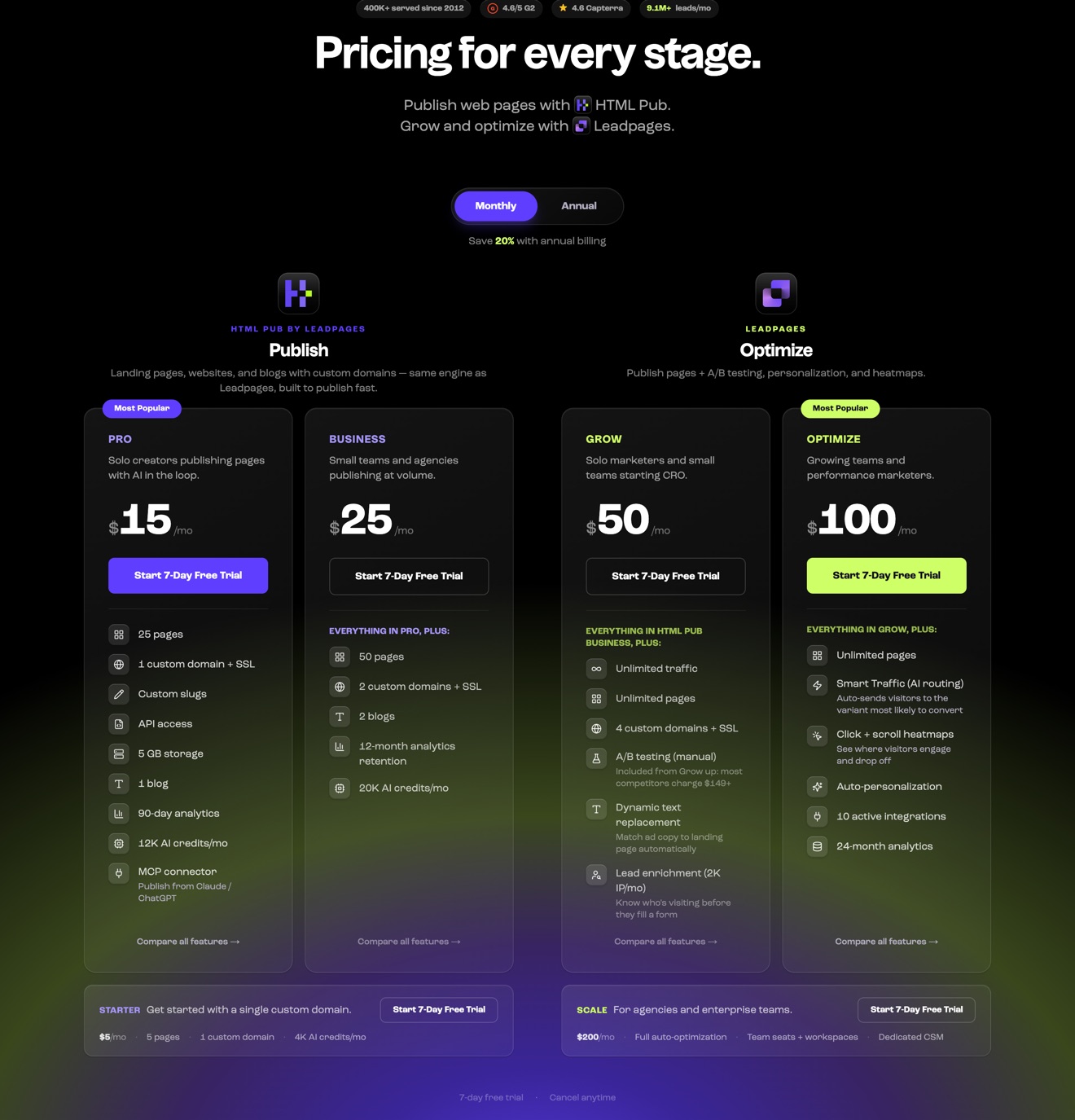
Short answer: Leadpages sells three plans, Grow, Optimize and Scale. Its pricing page cards show $50, $100 and $200 a month, but its own FAQ, homepage and help center say $99, $199 and $399. Annual billing saves 20%. There's also a cheaper publishing-only product, HTML Pub, that starts at $5 a month. Every plan has unlimited pages and unlimited traffic with no overage fee. The trial is 7 days and you'll need a card. Prices checked on September 16, 2026.
Leadpages has rebuilt its product and its price list. The plans you've read about for years, Standard, Pro and Conversion, are gone. So is the $697 tier and the 5-page limit on the entry plan. The new plans are simpler. The prices are confusing, because the site shows two different sets of them.
In this guide we'll walk through what each plan costs, what you get, what else can land on the bill, and how the total compares with Swipe Pages if you're running paid campaigns.
Let's start with the two sets of prices, because which one you get decides what you'll actually pay.
| Where we looked | Grow | Optimize | Scale |
|---|---|---|---|
| Pricing page cards, monthly billing | $50/mo | $100/mo | $200/mo |
| Pricing page cards, annual billing | $40/mo | $80/mo | $160/mo |
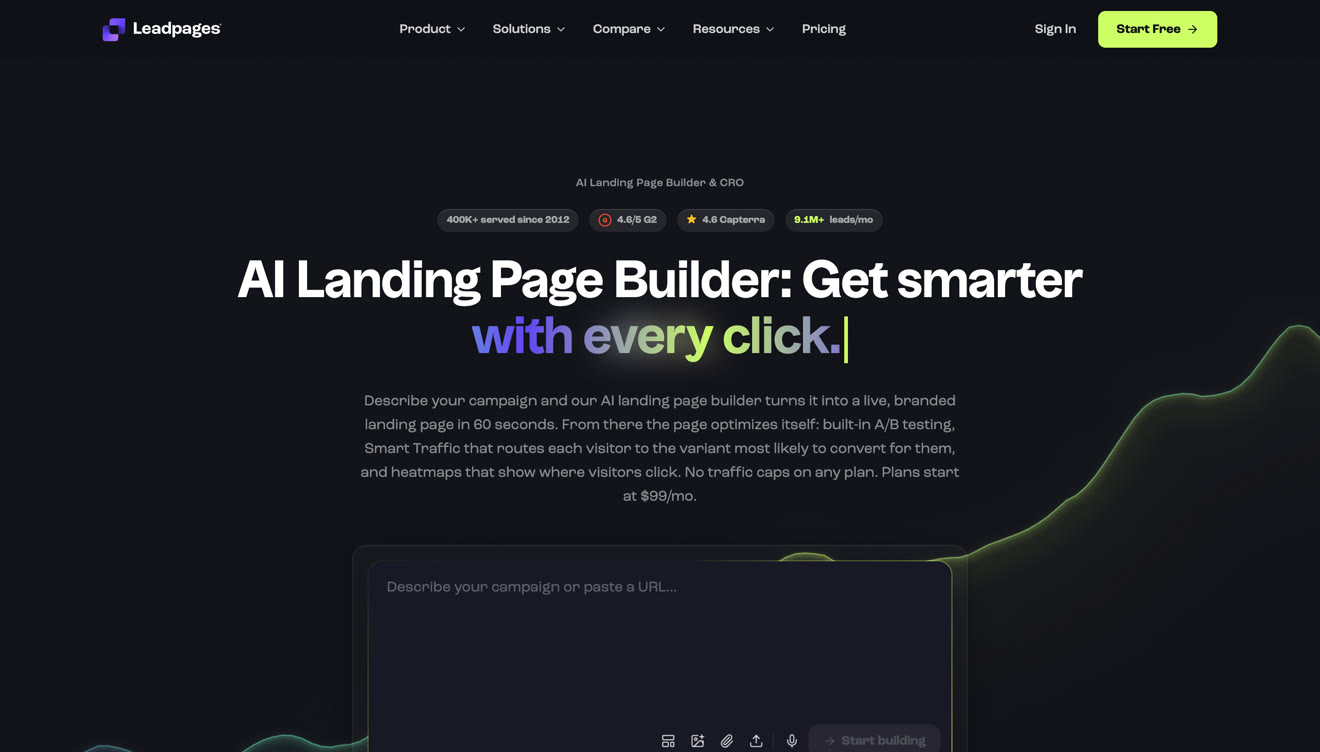
| Pricing page FAQ and page title | $99/mo | $199/mo | $399/mo |
| Homepage badge | Plans start at $99/mo | ||
| Help center, updated August 20, 2026 | $99/mo | $199/mo | $399/mo |
| Help center, annual | $79/mo | $159/mo | $319/mo |
There's no promo label anywhere near the cheaper cards, and the page's own underlying data doesn't list an active promotion. Either the cards show an intro price that isn't labeled, or Leadpages cut its prices and hasn't updated the rest of its site yet. We can't tell which from the outside.
Either way, check the price at checkout and take a screenshot before you subscribe. If you're charged $99 when the page said $50, you'll have something to show support.
Don't rely on third-party pricing guides for this either. Most of them still list Standard at $49 and Conversion at $697, and those plans don't exist anymore.
| Plan | Monthly (cards) | Annual (cards) | Monthly (FAQ and help center) | Best for |
|---|---|---|---|---|
| Grow | $50 | $40 | $99 | One person building lead pages |
| Optimize | $100 | $80 | $199 | A small team that wants testing data |
| Scale | $200 | $160 | $399 | Agencies and larger teams |
Grow is the entry plan. You get unlimited pages, unlimited traffic, 4 custom domains, 3 blogs, 3 brand kits, 15 GB of storage, AI page creation, A/B testing and dynamic text replacement.
Look at what's missing before you pick it. There are no team seats at all, you can only have 5 active integrations, and none of the optimization features are included. If you work alone with a small stack, it's enough. The moment you add a colleague, you're on Optimize.
Optimize raises most of the limits and adds the CRO features. You get Smart Traffic, heatmaps, auto-personalization, an insights dashboard and performance alerts. It also gives you 3 team seats, 6 domains, 10 active integrations and 24 months of analytics history.
It's the first plan a marketing team can actually share, since Grow has no seats.
Scale gives you 10 domains, 10 seats, 25 active integrations, 36 months of analytics, workspaces and audit logs. Plus, you get continuous auto-optimization and a dedicated success manager.
If you run an agency, the limit to watch is 10 domains. Client 11 means buying an extra organization, and Leadpages only shows that price inside the dashboard, not on its site.
If you're comparing against an older guide, here's how the old plans map to the new ones.
| Old plan | Old price | What replaced it |
|---|---|---|
| Standard | $49/mo | Grow, with unlimited pages instead of 5 |
| Pro | $99/mo | Optimize, which now holds the CRO features |
| Advanced or Conversion | Up to $697/mo | Scale, at a fraction of the price |
Three of these changes undo most of what older articles say about Leadpages, so keep them in mind:
A/B testing is no longer a paid upgrade. It used to need Pro. Now it's on every Leadpages plan.
The 5-page limit on the entry plan is gone. Every paid Leadpages plan now has unlimited pages. The only 5-page caps left are on HTML Pub Starter and on the free plan you drop to after canceling.
Lead enrichment and extra seats are no longer separate add-ons. Enrichment comes bundled with an allowance that depends on your plan, and seats come with Optimize and Scale.
If you're an existing customer, you keep your old price. Leadpages says it added A/B testing, dynamic text replacement and AI page creation to legacy accounts at no extra charge, and you can switch between the old and new experience.
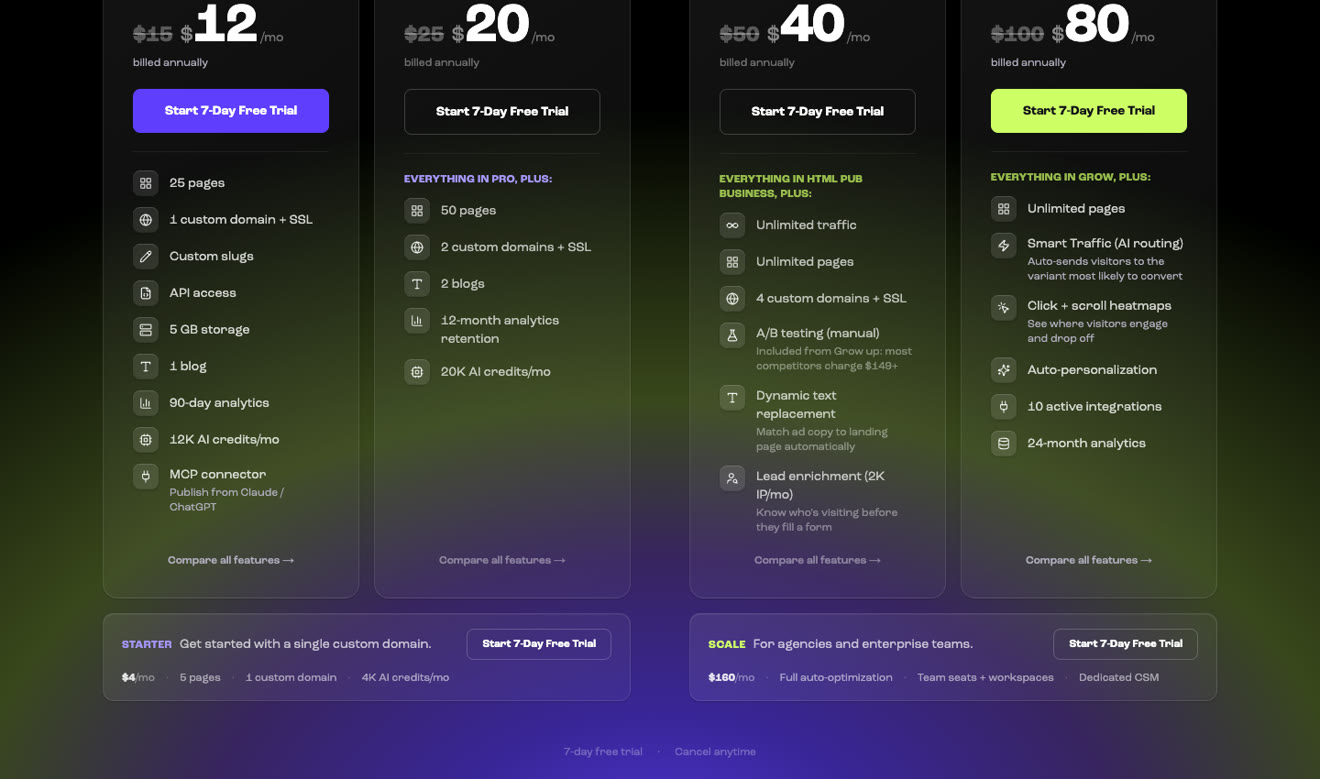
Leadpages also sells a second, cheaper product on the same page. It's called HTML Pub, and it publishes AI-generated pages to a live URL.
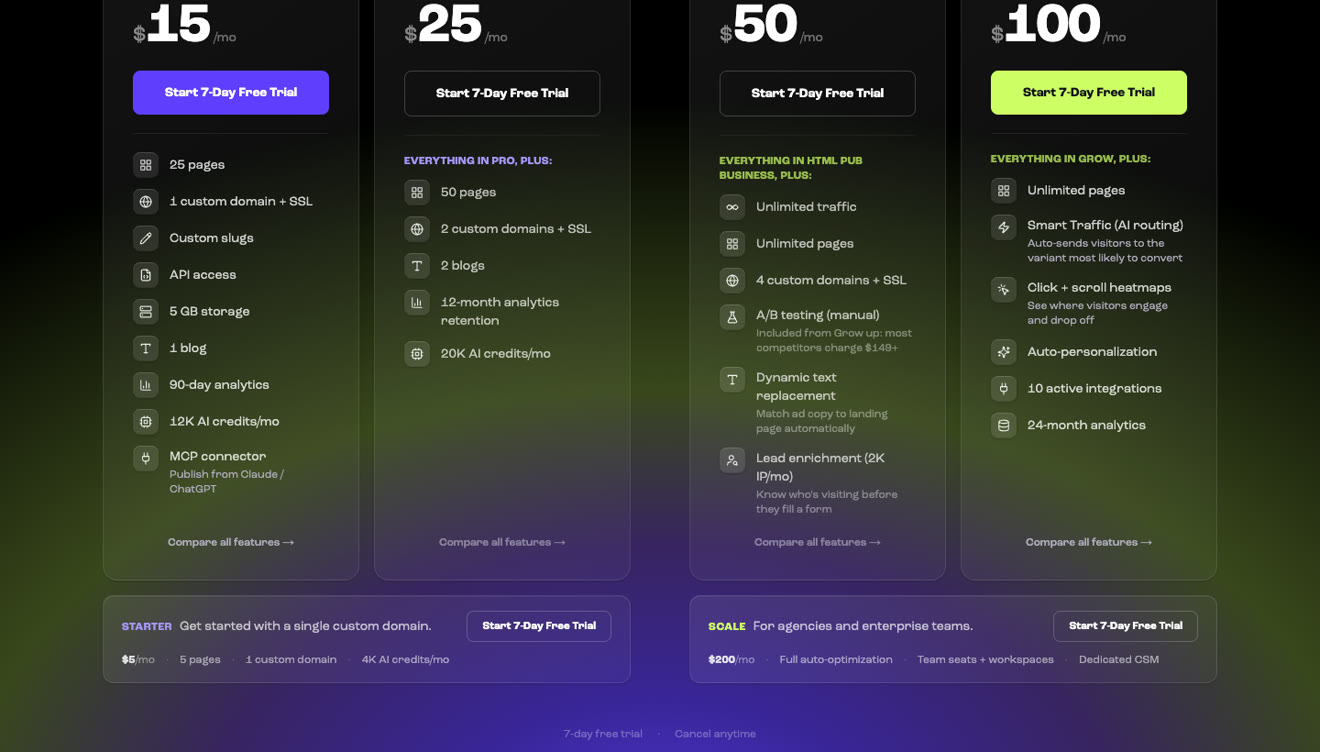
| HTML Pub plan | Monthly | Annual | Pages | Notable limits |
|---|---|---|---|---|
| Starter | $5 | $4 | 5 | 1 custom domain |
| Pro | $15 | $12 | 25 | API access, 1 blog, 90-day analytics |
| Business | $25 | $20 | 50 | 2 domains, 2 blogs, 12-month analytics |
None of the HTML Pub plans include A/B testing. Leadpages calls it the publishing layer, and treats Leadpages itself as the bigger product that adds testing, Smart Traffic, heatmaps and personalization on top. If you just want a cheap place to host pages an AI wrote, it's a fair deal. If you want to improve those pages once they're live, you'll need the full product.
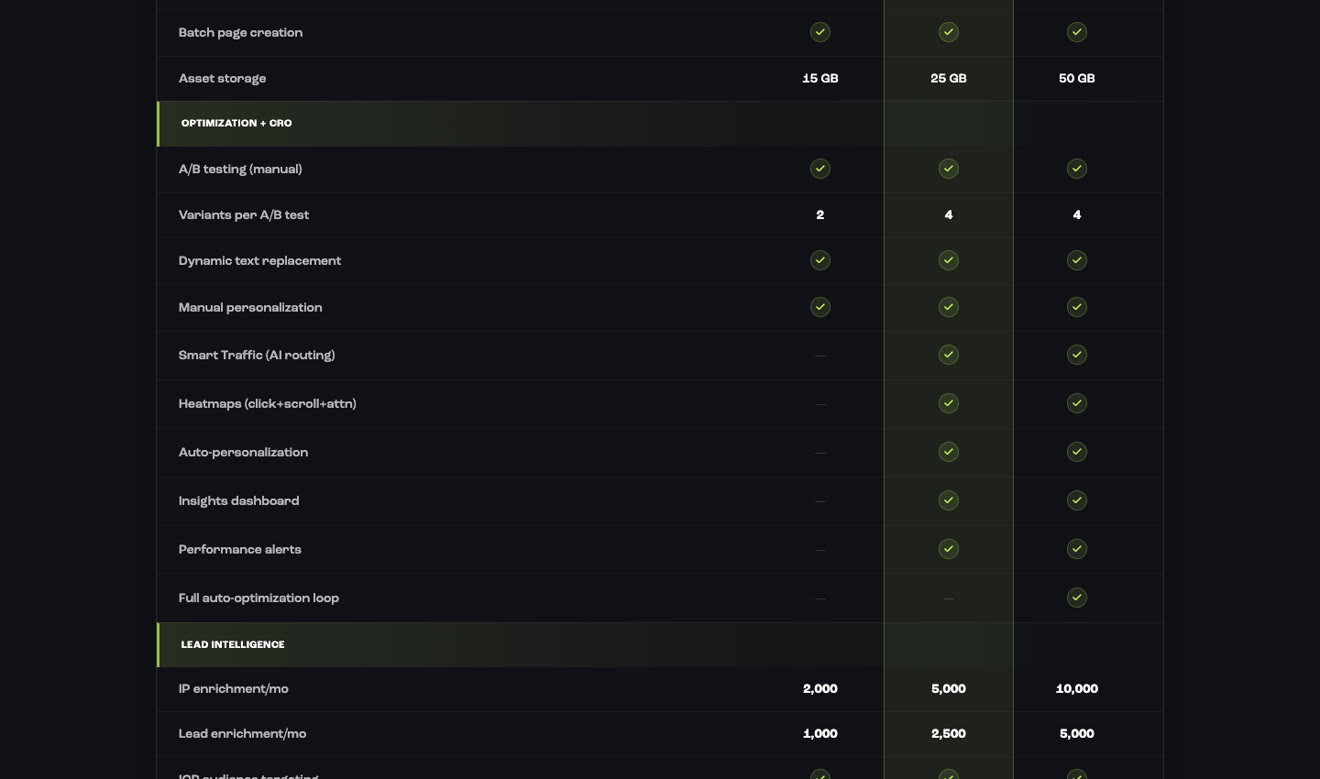
| Feature | Grow | Optimize | Scale |
|---|---|---|---|
| Landing pages | Unlimited | Unlimited | Unlimited |
| Traffic | Unlimited, no overage | Unlimited | Unlimited |
| Custom domains | 4 | 6 | 10 |
| Blogs | 3 | 5 | 10 |
| Asset storage | 15 GB | 25 GB | 50 GB |
| AI page creation | Yes | Yes | Yes |
| A/B testing | Yes, 2 variants listed | Yes, 4 variants listed | Yes, 4 variants listed |
| Dynamic text replacement | Yes | Yes | Yes |
| Smart Traffic, heatmaps, auto-personalization | No | Yes | Yes |
| Active integrations | 5 | 10 | 25 |
| Team seats | None | 3 | 10 |
| Workspaces and audit logs | No | No | Yes |
| Analytics retention | 12 months | 24 months | 36 months |
| Support | Standard | Email priority | Dedicated CSM |
If you care about testing, watch out for one more mismatch. The pricing table lists 2, 4 and 4 variants per test, while the help center says 6, 6 and 12.
Leadpages has fewer fees than most builders. There's no traffic overage and no platform fee on payments. Here's what can still push your bill up.
AI top-ups. Every plan comes with a monthly pool of AI credits that resets each cycle. If you use them up, Leadpages sells one-time top-ups that don't expire.
Upgrading for seats. Grow doesn't include any team seats, and Leadpages doesn't publish a per-seat price. If you want a second person in the account, that means upgrading to Optimize.
Upgrading for integrations. Five active connections run out fast. A CRM, an email tool, Google Ads, Meta Ads, Zapier and a scheduling app already adds up to six.
Extra organizations. You can add these on all three plans, but Leadpages only shows the price inside the dashboard.
Card processing. You'll pay Stripe's own processing fees on every sale.
Annual commitment. To get the 20% saving you pay for a year up front. That's also the setup behind most of the billing complaints we cover below.
What you pay each month depends on your setup, not just the plan you pick. Here's what three common setups work out to, using the card prices, with the same setup on Swipe Pages for reference.
| Setup | Leadpages | Swipe Pages |
|---|---|---|
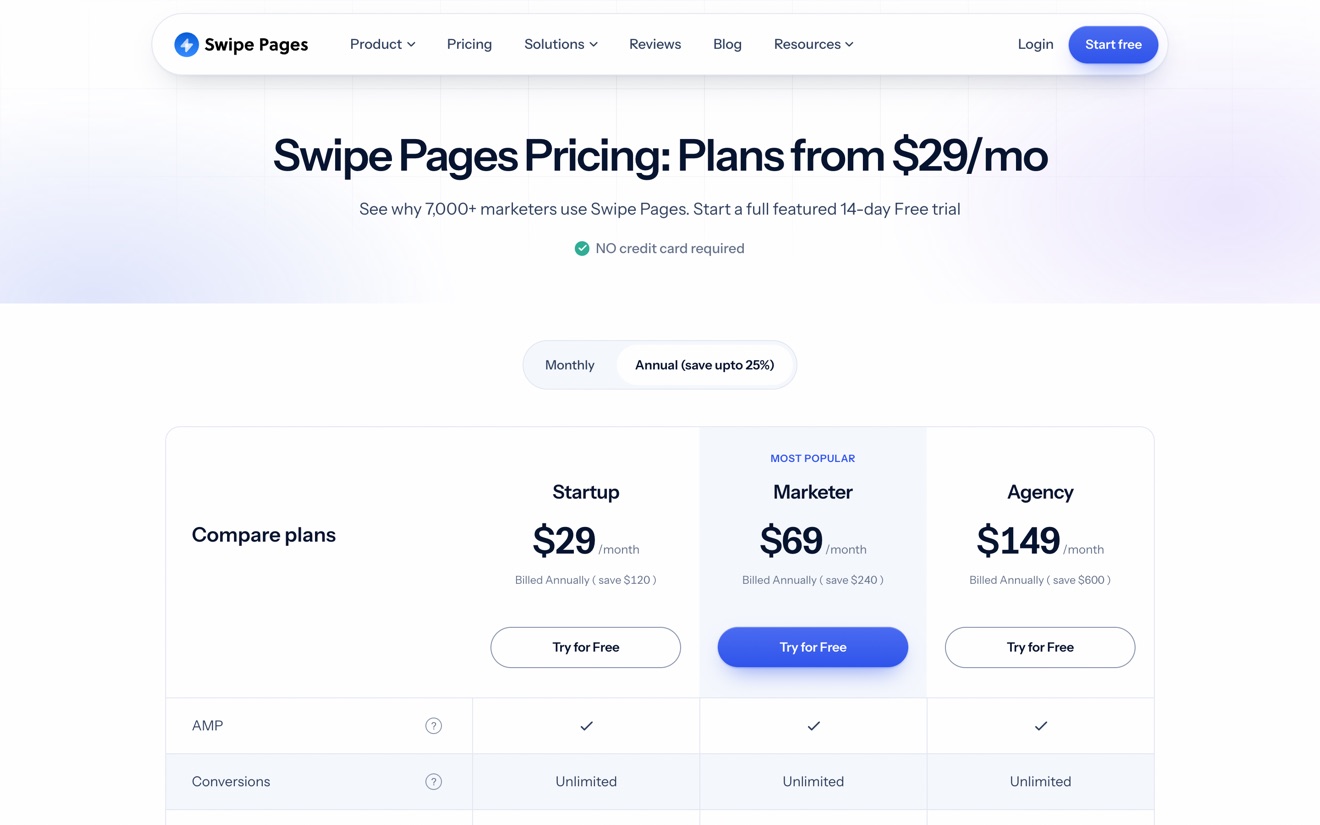
| Solo marketer, one brand, 5 tools connected, no team | Grow, $50/mo (or $99 in the FAQ) | Startup, $39/mo, or $29 billed annually |
| Small team of 3, wants heatmaps and traffic routing | Optimize, $100/mo (or $199) | Marketer, $89/mo, or $69 billed annually, with A/B testing and personalization |
| Agency, 12 client domains, 6 people | Scale, $200/mo (or $399), plus extra organizations at an unpublished rate, because Scale caps domains at 10 | Agency, $199/mo, or $149 billed annually, no domain cap |
The third row is where Leadpages gets hard to predict. Its published plans stop at 10 domains, and you can only see the price of the eleventh once you're inside the product.
If you run paid traffic, the subscription is rarely your biggest cost. Say you spend $5,000 a month on a campaign that converts at 3%. Lift that to 3.6% and you get 20% more leads for the same spend. That extra is worth several times either subscription.
That's why testing, mobile speed and being able to fix a live page count for more than a $50 difference in plan price. Leadpages includes testing on every plan, and that's a good thing. It doesn't include anything that reviews a page you've already published and tells you what to change.
Free trial. You get 7 days on every plan, and you'll enter a card at checkout. Leadpages' pricing FAQ says you're charged on day 7 unless you cancel. Another answer on the same page says your account pauses instead.
The terms disagree too. The terms of service, updated April 2, 2026, still say the trial is 14 days.
Money-back. New accounts get a 7-day money-back guarantee. It doesn't apply to renewals, and there's no prorated refund if you cancel mid-term.
Renewal. Your subscription renews on its own, and Leadpages reserves the right to change its fees with notice.
Cancellation. Your account drops to a free plan with a 5-page limit. Extra pages and domains get switched off rather than deleted.
Payments. Billing goes through Stripe or Paddle, and some accounts can also pay with PayPal, Apple Pay or Google Pay.
The product is better than its messy price list suggests. Unlimited pages, unlimited traffic, A/B testing and AI page creation on every plan is a decent package at $50, and a fair one at $99.
The part to be careful about is billing. Here's what recent reviews say.
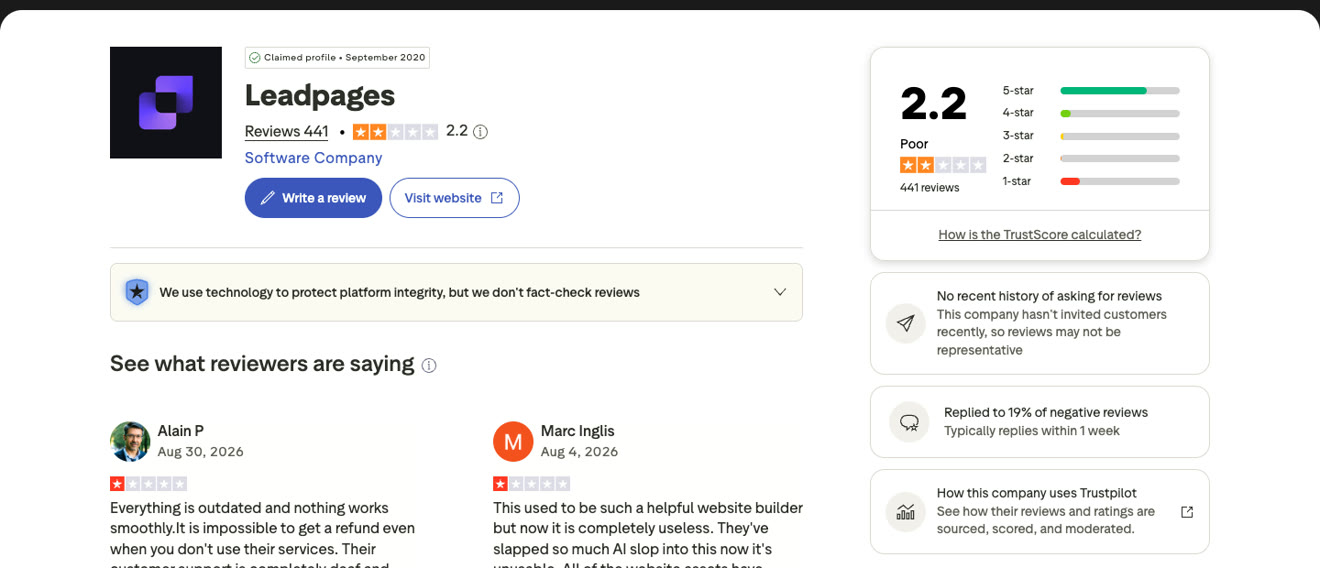
We read 61 reviews from 2025 and 2026, 56 of them on Trustpilot and 5 on G2. Of those, 24 described billing problems and 8 described trouble canceling. Leadpages scores 4.3 on G2 and 4.5 on Capterra, where most reviews come in by invitation, and 2.2 on Trustpilot, where they don't.
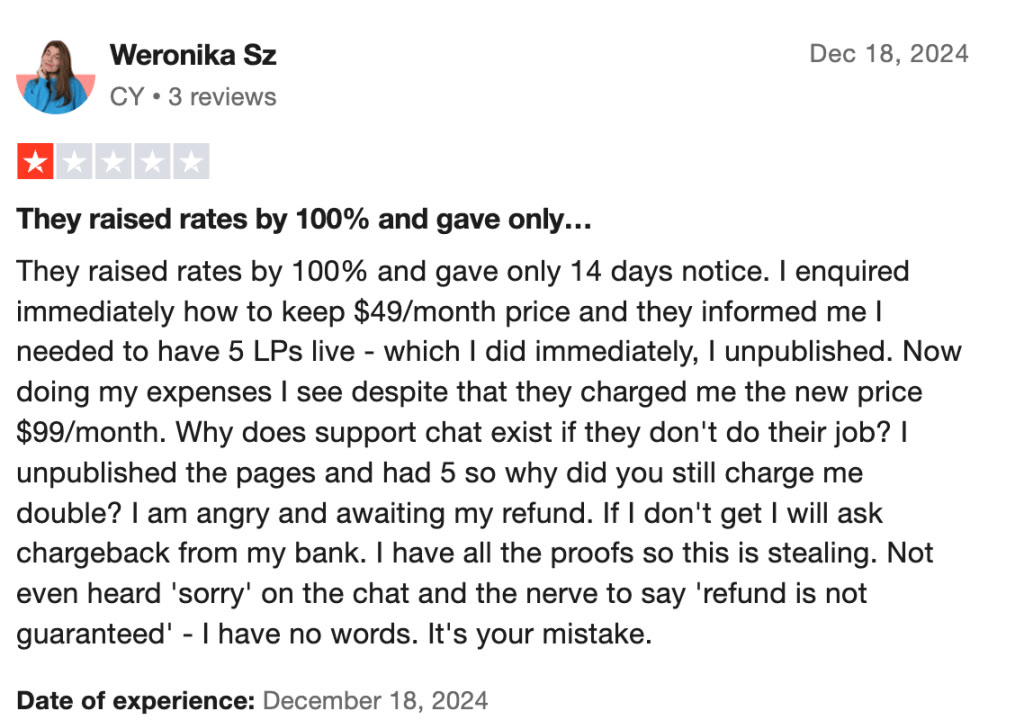
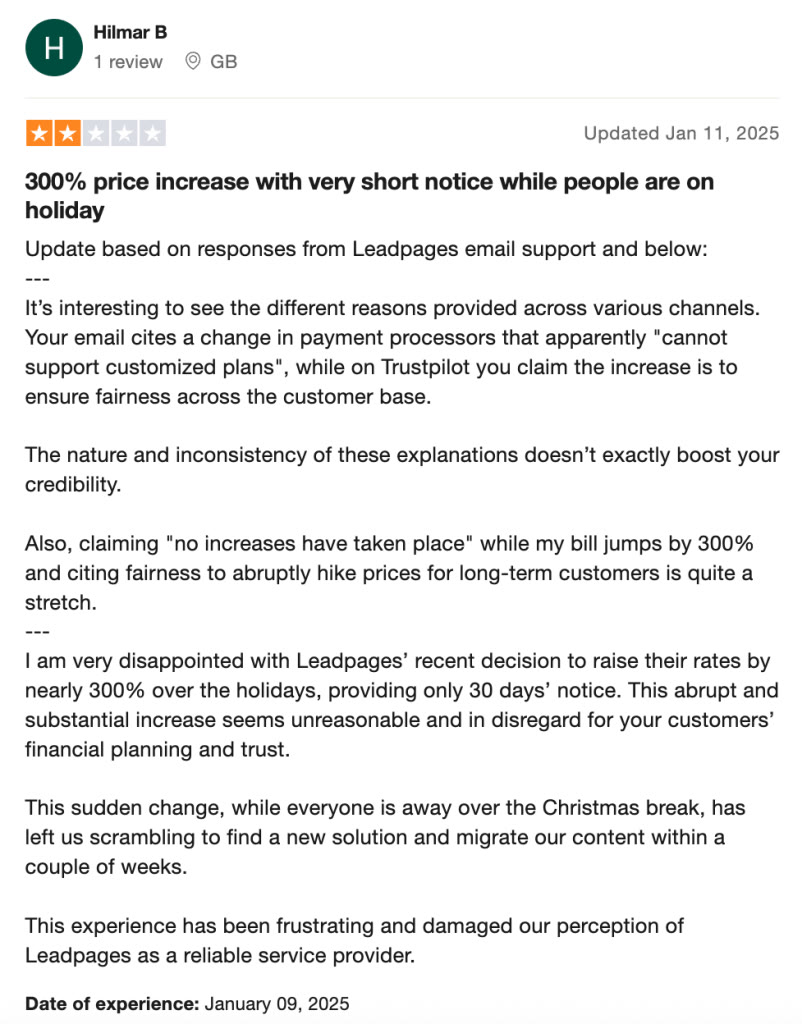
None of this means it'll happen to you. It's still a good idea to set a reminder before day 7 of the trial, and another one before your renewal date.
For a plan-by-plan look at the features, read our Leadpages review.
| Tool | Entry price | First plan that can A/B test | Free trial |
|---|---|---|---|
| Swipe Pages | $39/mo ($29 annually) | $89/mo | 14 days, no card |
| Leadpages | $50/mo on the cards, $99 in the FAQ | Entry plan | 7 days, card required |
| Unbounce | $29/mo Starter (5 pages, 500 visitors) | $149/mo | 14 days, no card |
| Instapage | $99/mo ($79 annually) | $199/mo | 14 days, card required |
| Landingi | $24/mo billed annually | $119/mo billed annually | 14 days, capped at 200 visits |
| Systeme.io | Free, then $17/mo | Not listed | Free plan |
Pay more attention to the second column than the first. The entry price tells you what a tool costs before you can test anything, and testing is what you'll use a landing page builder for. On the first plan that can run a test, Leadpages does well against Unbounce and Instapage, and Swipe Pages sits between them with mobile-first pages and CRO audits included.
| Leadpages | Swipe Pages | |
|---|---|---|
| Entry plan | $50/mo on the cards, $99/mo in the FAQ | $39/mo, or $29 billed annually |
| Middle plan | $100 or $199/mo | $89/mo, or $69 billed annually |
| Top self-serve plan | $200 or $399/mo | $199/mo, or $149 billed annually |
| Annual saving | 20% | Up to 25% |
| Free trial | 7 days, card required | 14 days, no card |
| Traffic | Unlimited, no overage | 20,000 to 500,000 by plan, then $5 per 5,000 visits |
| A/B testing | Every plan | Marketer and Agency |
| AI page building | Every plan | Every plan |
| CRO audits of live pages | Not found | Every plan |
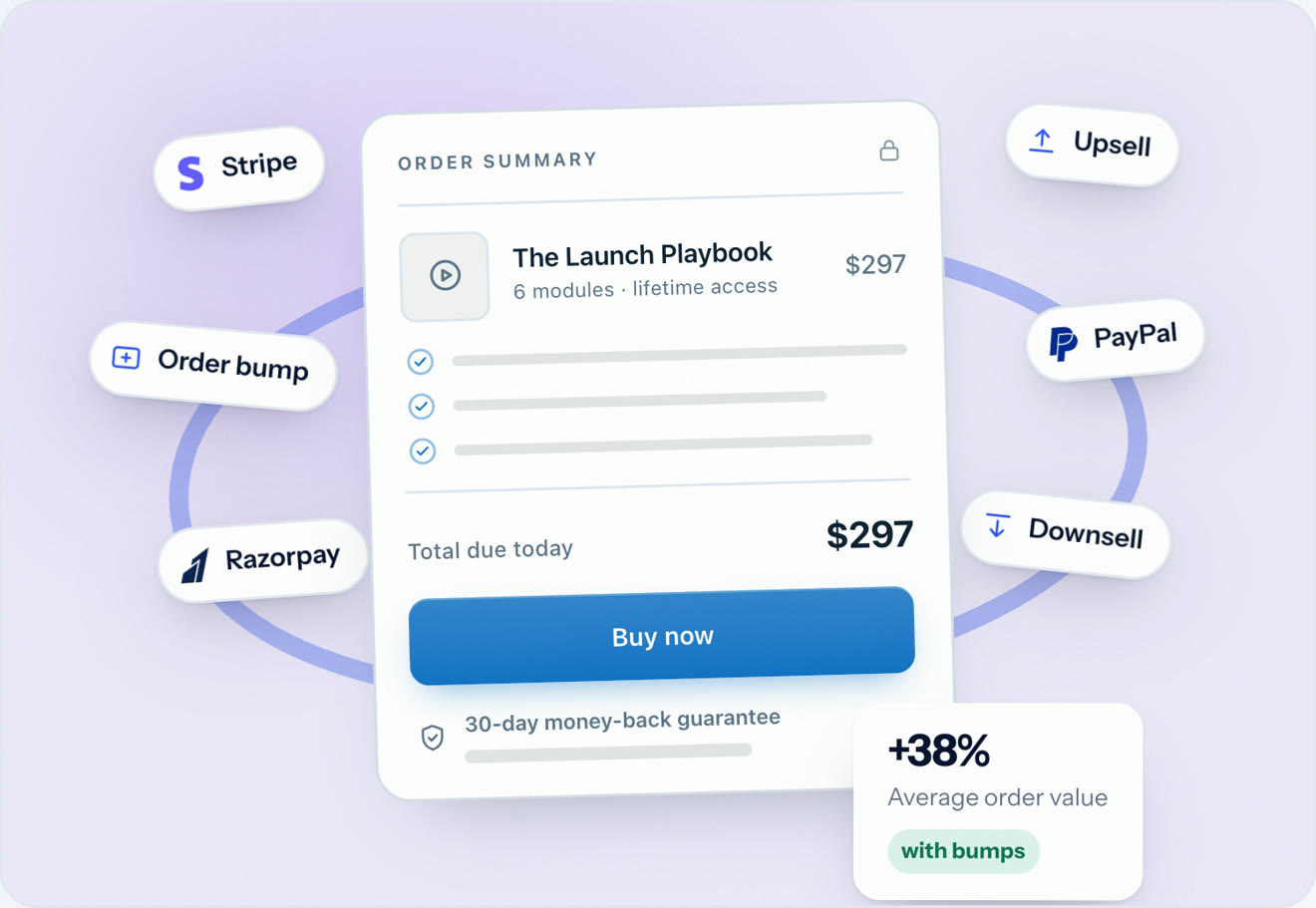
| Checkout | Stripe | Stripe, PayPal and Razorpay |
| Team seats | None on the entry plan | Included from Marketer |
| Domains | 4, 6 or 10 | 1, 5, or no cap on Agency |
Traffic is metered on Swipe Pages, by plan, and the overage rate is printed on the pricing page rather than in the terms.
If you're buying traffic, the picture changes, because your ad spend is a much bigger cost than either subscription.
Performance you don't pay extra for. Optimization runs when you publish, on every plan, including the $39 one. Smart Pages come with every plan instead of being sold as an upgrade. On other platforms you either install a plugin, buy an add-on or do the speed work yourself.
Two AI agents, not one. The AI Builder writes and edits pages, lead quizzes and checkout pages. The AI Strategy agent researches your competitors and audits pages you've already published, then hands its report to the AI Builder to act on.
Checkout on every plan, with Stripe, PayPal and Razorpay. That includes the $39 Startup plan.
A published overage rate. It's $5 per 5,000 visits, listed on the pricing page, so you know what a traffic spike will cost before it happens.
An Agency plan with a number on it. You pay $199 a month for 500,000 visitors, unlimited client sub-accounts and no domain cap. See Swipe Pages for agencies.
A 14-day trial with no card, so there's no day-7 charge to worry about.
Choose Leadpages if you're one person, you get a lot of traffic, you sell through Stripe, and unlimited traffic with no overage is the one thing you care about most.
Choose Swipe Pages if you buy clicks. Mobile speed, an AI that audits pages you've already published, checkout on every plan and an agency price you can read without a sales call all help lower your cost per conversion.
For more options, see the best Leadpages alternatives.
The pricing page shows $50, $100 and $200 for Grow, Optimize and Scale. The FAQ, homepage and help center show $99, $199 and $399. Annual billing takes 20% off. Check the figure at checkout before you pay.
Yes, you get 7 days on every plan, and you'll need a credit card. Leadpages' pricing FAQ says you're charged on day 7 unless you cancel first, while another answer on the same page says the account pauses.
Not for publishing. The homepage says Start Free, but the pricing page doesn't list a free plan that lets you go live. If you cancel, your account falls back to a free plan with a 5-page limit.
No. Every Leadpages plan includes unlimited traffic with no overage fee. Swipe Pages gives you a visitor allowance by plan and charges $5 per 5,000 visits above it.
There's a 7-day money-back guarantee for new accounts. It doesn't cover renewals, and the terms say there's no prorated refund if you cancel mid-term.
No. Leadpages doesn't sell one, and the word doesn't appear on its pricing page. The pages that rank for it are coupon sites and waitlists.
HTML Pub Starter, at $5 a month or $4 billed annually, gets you 5 pages and 1 custom domain. It doesn't have A/B testing. The cheapest full Leadpages plan is Grow.
Yes. Upgrades apply right away and are prorated. Downgrades kick in at the end of your billing period. The pricing FAQ says changes take effect on the next cycle instead, so that's one more spot where the site contradicts itself.
No. Leadpages doesn't add anything on top of Stripe's own processing fees on checkout sales.
It saves 20%, but it also locks you in for a year with a company whose most common complaint in recent reviews is billing. If you're new to the platform, a month or two on monthly billing doesn't cost much and keeps your options open.
At the card price of $50 it's more expensive than the $39 Swipe Pages Startup plan. At the FAQ price of $99 it's more than twice as much.
Written By Swami
Unbounce pricing for 2026: all six plans and their limits, the $80 per 10,000 visits overage fee, what each tier gates, and how the real bill compares.
Written By Swami
Instapage pricing for 2026: every plan and limit, why testing costs $199, what happens at your visitor limit, trial and refund terms, and what it really costs.
Written By Swami
Most landing pages don’t fail because the product is weak. They fail because a piece is missing, or the pieces show up in the wrong order. A visitor lands…
Start a 14 day full featured trial. No Credit Card Required.
Choose a plan when you are ready.